
YI Smart
ZKCam Technology LimitedVideo Players & Editors
4.086.00 Reviews
- Version
- 1.2.4_20260113
- Installs
- 100.00K
- Age Rating
- Everyone
Screenshots
Our Review of YI Smart
 Analysis by Appyee
I like the idea of checking in on home from my phone, but a camera app is only useful if I can get from installation to a clear live view without turning setup into a project. YI Smart is aimed at that practical routine: connecting with compatible YI cameras and using live video and audio to stay in touch with family. It is free to install, with optional in-app purchases, so I’d approach it as a camera companion rather than a general-purpose video editor or a replacement for every smart-home tool.
For a first-time user, the most helpful expectation is a simple one: the app is where you manage a camera connection and check what it can show or hear. It makes the most sense if you already have, or plan to use, YI camera hardware. If you are choosing a camera system from scratch, check that the specific camera you intend to use works with the app before building your routine around it. The name alone is not a reason to assume every camera will connect.
Getting Started with YI Smart
First things first, downloading and setting up the YI Smart app is a breeze. Available on both Android and iOS, the app is a quick download from the store. Once installed, you'll need to create an account or log in if you're already a user. No sweat here – the interface is clean and intuitive, which is always a plus in my book.
After logging in, adding devices is straightforward. The app guides you through connecting your YI cameras with step-by-step instructions. I appreciated this because, let's be honest, some of us might need a little hand-holding in this department. The whole process was seamless, and I had my camera linked in just a few minutes.
Make the First Check Useful
For a new user, pairing the camera is only the first milestone. I’d make the first successful check a deliberate one: open the live view while you are at home, confirm that the image shows the area you actually care about, and try the audio before relying on it from somewhere else. That quick test helps separate a camera-placement issue from an app-navigation issue, and it gives you a familiar baseline for later checks.
A realistic routine might be checking the entryway after a delivery notification or looking in on a pet while you are out. In either case, decide in advance what you need to learn from the feed. A wide view of a room can be more useful than pointing the camera at a single object, while a camera facing a bright window may make details harder to judge. These are placement trade-offs, not settings the app can solve for you.
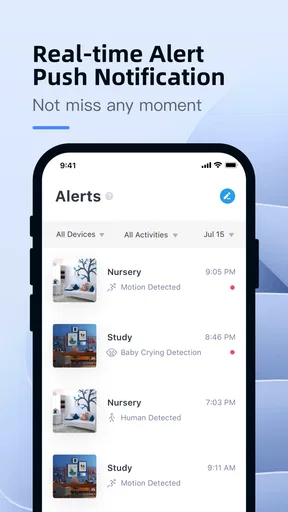
I’d also avoid treating a notification as proof that something important has happened. Motion alerts can be useful prompts to open the camera, but a moving shadow, a pet, or ordinary activity may also draw attention. The practical workflow is to use the alert as a reason to check the live view, then decide whether any follow-up is needed. That keeps the phone from turning every movement into an emergency.
Features That Stand Out
Now, let's talk about the features. What makes YI Smart a standout is its array of functionalities designed to enhance your security experience. One of my favorites is the motion detection alerts. Whenever the camera senses movement, the app sends a notification straight to your phone. This is fantastic if you're out and about and want to keep an eye on things back home.
The app also offers a live stream option, allowing you to view what's happening in real-time. The video quality is impressive, even at night, thanks to the night vision feature. I found this super handy, especially when I was away for the weekend and wanted to check in on my place.
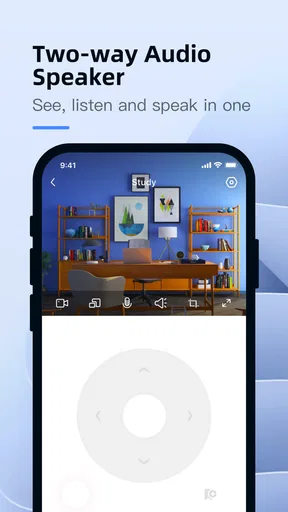
One more feature worth mentioning is the two-way audio. This lets you communicate through the camera, which is perfect for telling your pup to get off the couch or even chatting with a delivery person.
Everyday Use, Without Guesswork
Two-way audio has a different job from a phone call: it is tied to the camera’s location. That makes it handy for a brief instruction or greeting, but I would not choose it for a long conversation where privacy, clarity, or a natural back-and-forth matters. Before speaking, check that you have opened the intended camera, especially if you manage more than one. It is a small habit that avoids addressing the wrong room.
For family check-ins, the live feed and audio can be a simple way to see whether someone is around and say a quick hello. It is less suited to replacing a dedicated video-calling app, where both people use their own screens and can participate from anywhere. The camera-centered approach is convenient when the other person is near the device; a regular call is better when you need a conversation independent of the home camera.
Night vision is useful for checking a dim space, but it should not change what you expect from a remote view: you are looking at what the camera can see from its fixed position. If the view seems unhelpful, first consider the angle and what is in the frame rather than assuming the app can provide another viewpoint. A short test at the time of day you usually check in can reveal whether the placement suits your routine.
Usability and User Experience
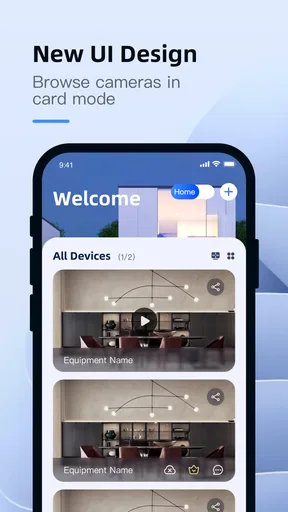
When it comes to usability, the app scores high marks. The interface is user-friendly, with everything you need accessible from the main dashboard. I didn't find myself fumbling around to find settings or features, which is a win in my book. The app also supports multiple cameras, and switching between them is as easy as pie.
Another point I loved is how responsive the app is. There's nothing worse than laggy software when you're trying to view a live feed or check an alert. With YI Smart, everything operated smoothly without any noticeable delays.
When Another Tool Makes More Sense
Compared with a typical video player or editor, this app has a narrower purpose: it is for viewing and communicating through connected cameras, not for polishing clips or organizing a video library. That focus can be an advantage if your main task is a quick home check. If you want to edit footage, assemble clips, or use one app for a broad range of video sources, a dedicated editor or general media player is the more appropriate choice.
It is also worth distinguishing a camera dashboard from a full home-security service. The app can help you view a camera and respond to what you see, but I would not treat the presence of a live feed as a guarantee that someone is monitoring your home or that every incident will be captured. If you need a broader security setup, compare the camera system and any services you intend to use rather than relying on the app alone.
Multiple cameras are useful when you want to move between rooms, but they also make naming and placement matter more. Give each camera a clear, location-based identity during setup if the interface allows it; otherwise, take a moment to learn which view corresponds to which space. That is a modest bit of housekeeping that can save confusion when an alert arrives and you want to open the right feed quickly.
Security and Privacy
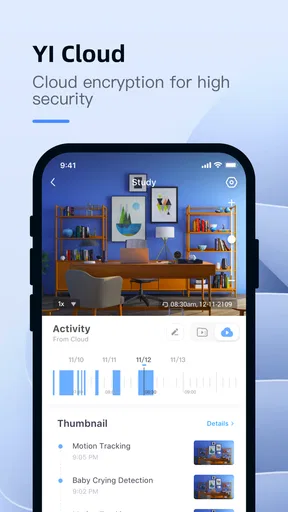
In today’s world, security isn’t just about keeping intruders out of your home; it’s also about protecting your data. The app uses end-to-end encryption to ensure your video feeds and personal information are kept safe. This peace of mind is crucial for anyone serious about home security.
Even with a camera app, privacy still depends on how you use the camera in your home. I’d point it only at areas you genuinely need to check, consider who else may appear in view, and be thoughtful about when two-way audio is appropriate. If several people share access to the home setup, agree on the intended use so that checking a room feels expected rather than intrusive.
Before installing, it is sensible to check that your phone’s operating system is supported and that you can sign in to the account you plan to use. The app is rated for Everyone and is available at no cost, though optional in-app purchases range from $2.99 to $129.99 per item. I would look at what a purchase offers before paying; the free download does not mean every optional feature or service is automatically included.
Who It Suits—and Who Should Pass
I’d recommend considering it if you own compatible YI cameras, want a straightforward way to check a home view, and value quick audio contact from the camera’s location. It is especially practical for someone who wants a familiar check-in routine rather than a complicated control panel. The developer is ZKCam Technology Limited, and the app sits in the video players and editors category, though its useful role here is specifically camera viewing and communication.
I’d look elsewhere if you do not have a compatible camera, want a conventional video-calling tool, need editing features, or expect a single app to provide a complete security service. The key decision is not whether a camera app sounds useful in general; it is whether this camera-centered workflow matches the device and routine you already have. That check can spare you from installing an app that does not fit your setup.
The app has an average rating of 4.1 from around 1.1 thousand ratings, with 81 written reviews, and more than 100 thousand installs. Those figures suggest that it has found an audience, but I would still prioritize the practical match between your camera and your needs. Its current version is 1.2.4_20260113, and it requires Android 7.0 or later on Android devices.
Final Thoughts
Overall, the YI Smart app is a solid choice for anyone looking to up their home security game without breaking a sweat. It's easy to use, packed with features, and offers reliable performance. Whether you're a tech novice or an experienced user, this app makes managing your security cameras a hassle-free experience.
If you're interested in giving it a try, you can download the app directly from the Google Play Store or the Apple App Store. Trust me, your future self will thank you for making life just a bit easier.
My advice is to start with one camera and one clear purpose: confirm the view, try a live check, and test whether speaking through the camera suits the way you want to use it. Once that routine feels comfortable, adding another camera is easier to evaluate because you know what you need from it. That is the most reassuring path from installation to a genuinely useful first check.
Verdict
Strengths of YI Smart
- User-friendly interface with intuitive navigation.
- High-quality video streaming in real-time.
- Seamless integration with smart home devices.
- Customizable alerts and notifications.
- Affordable subscription plans for cloud storage.
Limitations of YI Smart
- Limited compatibility with older operating systems.
- Occasional connectivity issues reported.
- Some features require in-app purchases.
- No support for manual video download.
- Lacks advanced AI detection features.
Similar Picks in This Category
View All
Google TV
Google LLC3.9

iTunes
Apple4.7

YouTube
Google LLC3.8

MX Player
Amazon Mobile LLC4.2

CapCut - Video Editor
Bytedance Pte. Ltd.3.5

PLAYit-All in One Video Player
PLAYIT TECHNOLOGY PTE. LTD.4.5
Frequently Asked Questions
What is YI Smart and what features does it offer?
YI Smart is a comprehensive security camera app designed to work seamlessly with YI cameras. It offers features such as live video streaming, motion detection alerts, and cloud storage options. The app supports high-definition video quality and two-way audio, allowing users to communicate through the camera. It is compatible with both Android and iOS devices.
How user-friendly is the YI Smart app for beginners?
The YI Smart app is designed with user-friendliness in mind, featuring an intuitive interface that guides users through the setup process. Beginners can easily navigate through the app’s settings, access live feeds, and manage camera settings without any technical expertise. It also offers a comprehensive help section and customer support for troubleshooting.
What are the subscription options for cloud storage in YI Smart?
YI Smart provides several subscription options for cloud storage, allowing users to choose plans based on their needs. Options typically include monthly and yearly subscriptions with varying levels of storage capacity. Users can access stored footage from anywhere, ensuring their data is safe even if the physical camera is damaged or stolen.
Is the YI Smart app compatible with all YI cameras?
The YI Smart app is compatible with most YI camera models, but it is always recommended to check the compatibility list on the official website before purchasing. The app supports integration with various models, offering a unified platform to manage multiple cameras, thus providing a scalable security solution for both home and business uses.
What privacy measures does YI Smart implement to protect user data?
YI Smart implements robust privacy measures to ensure user data is protected. It uses encryption protocols to safeguard video streams and stored footage. Additionally, users have control over who can access their camera feeds and can set up password protection. The app regularly updates its security features to address emerging threats.
